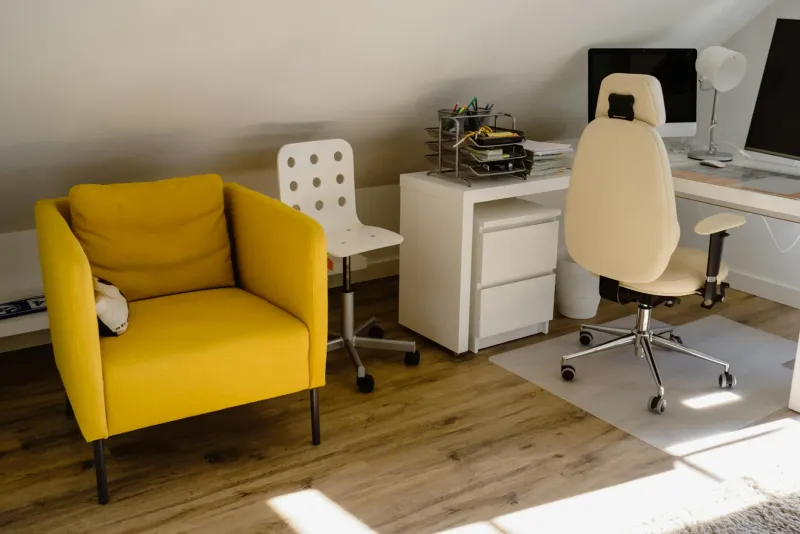
The best office chair under 200 is not the one with the most dramatic headrest or the most polished product photo. It is the chair that gives your lower back enough support, lets your feet rest flat, and stays comfortable after lunch. That is the standard I use when I review budget chairs for people working from home.
I have worked remotely since 2019, and my first home-office chair was exactly the kind of rushed budget buy most people make: acceptable for two weeks, annoying after two months. Since then I have learned to look past the marketing words and check the parts that matter: lumbar adjustment, seat height, armrests, mesh quality and whether the chair suits a real 7-8 hour day.

COMHOMA Ergonomic Chair
A strong budget pick because it combines adjustable lumbar support, a headrest, reclining function and usable armrests without moving into premium-chair pricing.
Checked: 05/24/2026
How to choose a budget office chair
For this price range, I would ignore anything that sells itself only on thick padding. A budget chair should earn its place through adjustability. If you are coming from a kitchen chair, even a simple mesh chair with a decent lumbar support is a major upgrade, but there are still compromises.
Look for these first:
- Adjustable seat height that lets your feet rest flat.
- Lumbar support that lands on your lower back, not halfway up your spine.
- Breathable mesh if you work long days or live somewhere warm.
- Armrests that do not force your shoulders up.
- A realistic weight capacity with margin, not the absolute maximum you are close to reaching.
My rule is simple: if you work two or three hours a day, a lower-cost chair can be enough. If you work full time, get as close to the top of this budget as you can, or consider a refurbished higher-end chair.
What not to expect under 200
Budget chairs can be good, but they are not magic. You should not expect the same build quality, foam density, armrest precision or long-term parts availability you get from premium office brands.
Common compromises:
- Less precise lumbar adjustment.
- More plastic in the base and mechanism.
- Fixed or limited seat depth.
- Armrests with fewer directions.
- Foam that may flatten sooner.
- Less refined recline.
- Shorter warranty or less predictable support.
That does not make them useless. It means you buy them for the right job: replacing a dining chair, improving a temporary home office, or creating a safer setup while staying within a tight budget.
What you should still get
Even under 200, do not accept a chair that gives you no control.
You should still look for:
- Seat-height adjustment.
- Some form of lumbar support.
- A backrest that reaches high enough for your body.
- Mesh or breathable back if you work long days.
- Armrests that do not trap you far from the desk.
- Stable base and smooth wheels.
If a chair has a racing shape, thick padding and no useful adjustment, it is probably the wrong budget choice for work.
Best office chairs under 200 compared
COMHOMA Ergonomic Chair
Checked: 05/24/2026
The strongest adjustment package in this price range: adjustable lumbar support, headrest, reclining function and armrests that make sense for daily desk work.

SIHOO M102C
Checked: 05/24/2026
A sensible mesh-back option with adjustable lumbar support, headrest and fold-up armrests. Good if you want a safer brand profile without going premium.
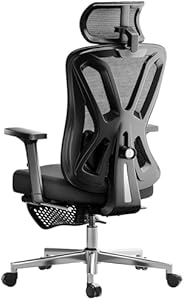
Hbada Ergonomic Chair
Checked: 05/24/2026
Clean design, mesh back, adjustable headrest and retractable footrest. Better for mixed work and short breaks than for people who need maximum lumbar precision.
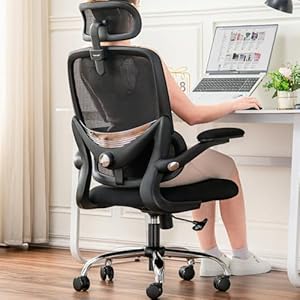
TONFARY Ergonomic Chair
Checked: 05/24/2026
High back, adjustable headrest and fold-up arms. Worth considering if neck support matters more to you than a very deep recline.
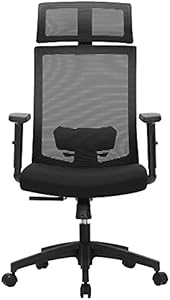
SONGMICS OBN55BK
Checked: 05/24/2026
A safer mainstream budget pick: mesh back, adjustable lumbar support and a brand with a stronger European track record than many generic Amazon chairs.
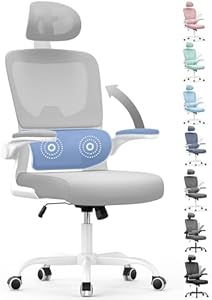
Naspaluro Office Chair
Checked: 05/24/2026
The low-budget entry point. It is not a premium chair, but it gives you a real step up from dining chairs and fixed-back desk chairs.
Detailed analysis of each chair
COMHOMA Ergonomic Chair: best all-round budget package
The COMHOMA stands out because it offers a lot of the adjustments people actually need in a home office: lumbar support, headrest, recline and armrests that make sense for desk work. It is the kind of chair I would consider if someone asked for one simple recommendation under 200.
Its main strength is balance. It is not trying to be a premium chair, but it gives you more ergonomic control than the very cheapest models. That matters if you work several hours a day and need something more serious than a padded task chair.
Best for:
- Remote workers on a fixed budget.
- People upgrading from a dining chair.
- Users who want lumbar support and headrest in one package.
- Small home offices where one chair has to handle work and calls.
Watch for:
- Whether the seat height fits your body.
- Whether the lumbar support lands in the right place.
- Whether armrest height works with your desk.
SIHOO M102C: safer ergonomic profile
The SIHOO M102C is a sensible choice if you want a more established ergonomic-chair direction without jumping into premium pricing. SIHOO is often considered because its chairs tend to focus on mesh backs, lumbar support and practical desk posture.
The fold-up arms can be useful in small rooms because you can slide the chair under the desk. The mesh back helps in warm spaces. The headrest is a plus if you use recline for breaks, though it should not be the main reason to buy the chair.
Best for:
- People who want a recognisable ergonomic budget brand.
- Small rooms where fold-up arms help.
- Warm home offices.
- Users who prioritise mesh over thick padding.
Hbada Ergonomic Chair: discreet design with comfort extras
The Hbada is more about a clean, comfortable home-office chair than maximum ergonomic precision. It can make sense if the chair sits in a visible living room or bedroom and you want something less technical-looking.
The retractable footrest is useful for short breaks, not for active work. Do not treat it as an ergonomic feature for typing. For work posture, focus on seat height, lumbar support and whether the armrests let you sit close enough to the desk.
Best for:
- Mixed work and casual use.
- People who value a cleaner visual design.
- Users who want a headrest and occasional recline.
Skip it if your top priority is the most precise lumbar and seat-depth fit.
Check Hbada on Amazon (opens in a new tab)TONFARY Ergonomic Chair: if neck support matters
The TONFARY is interesting for people who care about upper-back and neck support. A headrest can be useful if it lines up with your body, but it should not be treated as a cure for neck pain. Most neck pain from desk work comes from screen height, arm position and posture, not from the absence of a headrest.
Choose it if:
- You want a high-back chair.
- You recline during reading or calls.
- You need fold-up arms.
- Your desk space benefits from a chair that tucks away.
Before blaming the chair for neck pain, read neck pain from computer work. If your screen is too low, no headrest will solve the core issue.
Check TONFARY on Amazon (opens in a new tab)SONGMICS OBN55BK: mainstream budget safety
The SONGMICS OBN55BK is a safer mainstream budget option. It is not the most advanced chair in the list, but it has a simple appeal: mesh back, adjustable lumbar support and a brand presence that feels less anonymous than many generic listings.
This is the chair I would consider if you want a straightforward upgrade from a fixed chair and do not want to chase every possible feature. It is especially relevant for people who need something practical, available and easy to understand.
Best for:
- Basic home-office upgrades.
- People who want mesh and lumbar support.
- Buyers who prefer a mainstream budget brand.
Naspaluro Office Chair: the lowest-budget entry point
The Naspaluro is the entry point. It is not the chair I would recommend for everyone working full time, but it can be a meaningful improvement if the alternative is a dining chair, stool or old fixed office chair.
The key is expectations. At the lowest budget, you are buying a basic adjustable work chair, not a long-term ergonomic solution for heavy use.
Best for:
- Occasional remote work.
- Students or temporary setups.
- People who need the cheapest meaningful upgrade.
- Small budgets where any real office chair is a step forward.
If you work full days, I would try to move up the list.
Check Naspaluro on Amazon (opens in a new tab)My buying advice
If your budget is tight, buy the chair that solves the biggest problem in your current setup. Lower-back discomfort means lumbar support comes first. Sweating through summer calls for mesh. A very small room may make fold-up armrests useful because you can slide the chair under the desk.
Do not expect a chair under 200 to feel like a Herman Miller, Steelcase or Humanscale chair. The plastic base, foam density and long-term finish will be more basic. That is fine if you buy it with the right expectations. What matters is whether it improves your daily posture enough to stop your body paying for your workspace.
Four things to check before buying
1. Seat height
This is the first compatibility check. Your feet should rest flat with knees around 90 degrees. If the chair does not go low enough or high enough for your body and desk, every other feature matters less.
2. Lumbar support
Look for lumbar support that lands on the lower back. A visible pad is not automatically useful. It needs to meet your body in the right place.
3. Mesh vs padding
Mesh is usually better for long workdays and warm rooms. Padding feels softer at first but can trap heat and flatten faster in budget chairs.
4. Armrests
Armrests should let shoulders relax. Fold-up arms are useful in small rooms, but fixed arms can be a problem if they hit the desk and keep you too far from the keyboard.
Which one I would choose
For most people, COMHOMA is the strongest all-round pick because it offers the best adjustment package in this budget. If you prefer a more established mesh ergonomic direction, choose SIHOO M102C. If you want a simpler mainstream budget option, SONGMICS is safer than many anonymous chairs.
If back pain is already part of your workday, read the practical guide to back pain when working from home before buying. A chair helps, but it is only one part of the setup.
Match the chair to your main problem
The best budget chair depends on what is wrong now.
Lower-back discomfort
Prioritise lumbar support and seat depth. A headrest will not help if your lower back is unsupported for seven hours.
Neck and shoulder tension
Check armrest height, desk height and screen position before assuming the chair needs a headrest. A high-back chair can help during recline, but active work posture depends more on arms and monitor height.
Heat
Choose mesh. Thick padding feels comfortable at first, but budget foam plus warm rooms can become uncomfortable quickly.
Small room
Fold-up armrests can be useful because the chair slides under the desk more easily. Also check chair width and base diameter.
Occasional work
A cheaper chair can be acceptable if you work short sessions. For full-time remote work, buy the best fit you can within the budget.
Budget chair red flags
Avoid chairs that rely on:
- Racing-style looks with no real lumbar support.
- Very thick padding as the main selling point.
- Vague “ergonomic” claims with no adjustment details.
- No clear seat-height range.
- Armrests that cannot move at all.
- Product photos that hide the mechanism.
- No return path if the chair does not fit.
The chair does not need every premium feature, but it must fit your body and desk.
How to test the chair when it arrives
Use the first week as a fit test.
Day one:
- Adjust seat height.
- Set lumbar support.
- Set armrests.
- Check screen height.
- Sit for a normal work block.
After two hours, note what feels tired. Lower back, shoulders, thighs and feet tell you different things.
During the week, check:
- Does the seat edge press behind the knees?
- Do you slide forward?
- Do shoulders rise while typing?
- Does lumbar support stay in the right place?
- Does the backrest support you when you recline?
- Do wheels move smoothly on your floor?
If the chair causes clear discomfort after proper adjustment, return it instead of trying to force adaptation.
Cheap chair vs used premium chair
Used premium office chairs can be excellent, but they are not always the better choice. A used chair only makes sense if you can inspect condition.
Check:
- Gas cylinder holds height.
- Seat foam or mesh is not collapsed.
- Armrests adjust correctly.
- Lumbar support works.
- Backrest is not loose.
- Wheels and base are stable.
- Size fits your body.
If you cannot verify those things, a new budget chair with a return policy may be safer.
What to upgrade next
Once the chair is in place, the next improvement is usually not another chair accessory. It is one of these:
- Monitor height.
- Desk height.
- Footrest.
- External keyboard and mouse.
- Lighting.
- Movement breaks.
A budget chair performs much better inside a coherent setup. Use how to adjust an office chair properly after assembly, then check correct desk and chair height.
Final recommendation by case
- Best all-rounder: COMHOMA Ergonomic Chair.
- Safer mesh ergonomic route: SIHOO M102C.
- Mainstream budget pick: SONGMICS OBN55BK.
- Cheapest meaningful upgrade: Naspaluro.
- For visible rooms and breaks: Hbada.
- For high-back preference: TONFARY.
The right budget chair is the one that removes the biggest daily compromise without pretending to be a premium chair. Buy fit first, features second, aesthetics third.
How budget chairs fail over time
Most cheap chairs do not fail dramatically. They degrade quietly.
Watch for:
- Seat foam becoming flatter.
- Lumbar support losing firmness.
- Gas cylinder slowly sinking.
- Armrests wobbling.
- Recline mechanism becoming loose.
- Wheels scratching or sticking.
- Mesh losing tension.
If the chair is used full time, check it every few months. A chair that was acceptable in January may be the reason your posture feels worse in July.
Comfort vs support
Budget chairs often win people over with softness. Softness is not the same as support.
A supportive chair may feel firmer at first but better after several hours. A soft chair can feel pleasant when you sit down and worse when the pelvis sinks, the lower back rounds and the shoulders move forward.
For work, judge the chair after a normal day, not after the first five minutes.
Fit by body size
Shorter users should check minimum seat height and seat depth. If feet do not reach the floor or the front edge presses behind the knees, a footrest may help, but a too-deep seat remains a problem.
Taller users should check maximum seat height, backrest height and whether the headrest is actually high enough. A headrest that pushes the head forward is worse than no headrest.
Heavier users should leave margin below the maximum weight rating and prioritise a stable base.
Assembly notes
When assembling a budget chair:
- Tighten screws gradually, not all on one side first.
- Check the backrest is centred before final tightening.
- Do not overtighten plastic parts.
- Sit and retighten after a few days.
- Keep the manual in case a part needs replacement.
Many budget chairs feel worse than they should because they are assembled slightly crooked.
When to spend more than this category
Spend more if:
- You work full time and already have pain.
- You need seat-depth adjustment.
- You are outside average height ranges.
- You want parts availability and long warranty.
- You expect the chair to last many years.
Under 200 can be a good category, but it is not the end of chair buying. If the chair is the centre of your workday, stretching to a better ergonomic model can be rational.
Questions people ask before buying
Is a headrest necessary?
No. A headrest can be comfortable during recline, but it is not the main ergonomic feature for typing. Lumbar support, seat height, seat depth and armrests matter more for active desk work.
Are fold-up arms good?
They are useful in small rooms because the chair can slide under the desk. They are less useful if you need precise arm support while typing. Choose based on room layout.
Is a footrest needed?
Only if the chair has to be raised for the desk and your feet no longer rest flat. A footrest can make a budget chair work much better with a high desk.
Should I choose mesh or padded back?
For long workdays, mesh is usually safer. It breathes better and encourages contact with the backrest. Padding can feel nicer at first but gets hot.
How long should a budget chair last?
It depends on weight, hours of use and build quality. Full-time use wears budget chairs faster than occasional use. If you work from home every day, inspect the chair regularly and expect more wear than with premium models.
Setup after buying
Do not assemble the chair and start working immediately without adjustment.
Use this sequence:
- Set seat height.
- Check feet and knees.
- Place lumbar support.
- Adjust armrests.
- Check desk height.
- Raise monitor if needed.
- Work one full block and reassess.
Most complaints about budget chairs get worse when the chair is never adjusted correctly. The chair may still be limited, but you should at least test its best version.
If the chair is for a teenager or student
Budget chairs often end up in study bedrooms. For younger users, check height range carefully. A chair that is too high can leave feet dangling and encourage slouching.
Prioritise:
- Feet supported.
- Desk not too high.
- Backrest contact.
- Screen raised if using laptop.
- Breaks away from the desk.
Do not buy an oversized gaming-style chair just because it looks more impressive. Fit matters more.
If the chair is for shared remote work
If more than one adult uses the chair, choose broader adjustability. Seat height and armrests need to change quickly. Mark preferred settings if needed.
A chair that fits one person perfectly can be poor for another. Shared use is one reason to prioritise return policy and adjustability over looks.
Comfort checks by symptom
Lower back aches
Check whether you are sitting fully back. If you slide forward, the lumbar support is not doing anything. Adjust depth if possible or try a small lumbar cushion.
Thigh pressure
The seat may be too deep or too high. You should have a small gap behind the knees and feet should rest flat or on a footrest.
Shoulder tension
Armrests may be too high, the desk may be too high, or the mouse may be too far away. Lower armrests before blaming the backrest.
Neck tension
Check monitor height. A headrest does not fix a low laptop screen.
Heat and restlessness
If you keep shifting because the chair gets warm, choose mesh next time. Thermal comfort is part of work comfort.
Return policy matters
Budget chairs vary a lot by body size. Two chairs with similar specs can feel completely different. A return policy is not a minor detail; it is part of the purchase.
Keep packaging until you have completed several normal workdays. Test the chair with your actual desk, screen and keyboard, not in isolation.
What I would ignore in product pages
Budget chair listings often emphasise the wrong things. I would ignore oversized claims about “executive comfort”, dramatic recline photos, racing-style shapes and generic ergonomic badges.
Instead, look for concrete information:
- Seat height range.
- Backrest dimensions.
- Lumbar adjustment type.
- Armrest adjustment.
- Base material.
- Maximum user weight with margin.
- Real user photos.
If a listing cannot explain how the chair adjusts, assume the adjustment is limited.
Best upgrade path after a budget chair
If the chair works but the setup still feels off, upgrade around it:
- Footrest if the desk is high.
- Monitor arm if the screen is low.
- External keyboard and mouse if using a laptop.
- Better lighting if you lean forward to read.
- Movement routine if stiffness builds through the day.
This is why a budget chair can still be part of a good home office. It does not need to solve everything; it needs to fit into a setup that supports the body.