Choosing an ergonomic office chair is harder than it should be. Store pages all promise “all-day comfort”, most comparison articles repeat the same manufacturer claims, and star ratings do not tell you whether a chair will fit your body.
This guide is written for people who work from home for real: long calls, deep work blocks, warm rooms, improvised desks and the occasional day when you forget to stand up until your lower back reminds you. The goal is not to find the most expensive chair. It is to find the chair with the best balance of lumbar support, adjustability, build quality and sensible pricing.
This English version is intentionally generic. I am not pretending that one page can cover the buying intent of the US, UK and Canada perfectly. Until marketplace-specific English pages exist, prices are not converted and Amazon availability is handled through the site-wide OneLink setup.
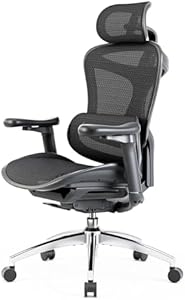
SIHOO Doro C300
The strongest all-round pick here: dynamic lumbar support, breathable mesh, 3D armrests and enough adjustment range for serious full-time home working.
Checked: 05/24/2026
Quick answer: which chair should you choose?
| Your situation | Start here | Why |
|---|---|---|
| You work from home full-time | SIHOO Doro C300 | Dynamic lumbar support, breathable mesh and the broadest adjustment package here. |
| You want many adjustments without going premium | FlexiSpot C7 Lite | 5D lumbar support, 3D headrest and 3D armrests in a practical mid-range chair. |
| You are shorter or taller than average | HOLLUDLE Ergonomic Chair | Adjustable seat depth is rare in this price band and matters more than people think. |
| You want a clean-looking chair with a footrest | Hbada Ergonomic Chair | Simple design, integrated footrest and enough features for mixed desk use. |
| You need a first proper office chair | SIHOO M102C | Adjustable lumbar support, headrest and folding armrests without jumping to premium pricing. |
| You need the cheapest workable option | Durrafy Ergonomic Chair | Basic lumbar support and headrest; better than a dining chair, but not a long-term premium solution. |
How I selected these chairs
I evaluate chairs by the parts that actually change your posture during the workday:
- Lumbar support: adjustable or dynamic support beats a fixed pad.
- Seat fit: height and depth determine whether your feet and thighs sit correctly.
- Armrests: at least height adjustment is useful; 3D armrests are better for keyboard and mouse work.
- Back material: breathable mesh helps in warm rooms and long sessions.
- Weight capacity and stability: a chair should not feel close to its limit.
- Verified identifiers: Amazon links use real ASINs already tracked in the Spanish source article.
What I do not reward: racing styling, gimmicky massage modes, vague “executive” wording or inflated comfort claims without practical adjustments.
When not to buy a chair from this list
Do not buy one of these chairs yet if the real issue is not the chair.
Wait if:
- Your monitor is still too low.
- Your desk height is clearly wrong.
- You work laptop-only with no external keyboard.
- You already have numbness or radiating pain that needs assessment.
- You have not measured your seat-height needs.
A better chair helps a lot, but it cannot fix a laptop screen on the desk or a keyboard that forces your shoulders up.
Comparison table
SIHOO Doro C300
Checked: 05/24/2026
Dynamic self-adjusting lumbar support, breathable mesh, 3D armrests and reclining backrest. The most complete chair in this comparison.

FlexiSpot C7 Lite
Checked: 05/24/2026
5D lumbar support, 3D headrest and 3D armrests. A strong option if you want adjustment range without paying premium-chair prices.

HOLLUDLE Ergonomic Chair
Checked: 05/24/2026
Adjustable seat depth, headrest and lumbar support. Especially interesting for users outside average height ranges.
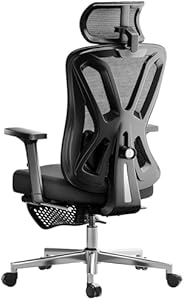
Hbada Ergonomic Chair
Checked: 05/24/2026
Clean design, breathable backrest, headrest, lumbar support and integrated footrest. Better for mixed home spaces than bulky gaming chairs.

SIHOO M102C
Checked: 05/24/2026
A practical first ergonomic chair with adjustable lumbar support, headrest and folding armrests for smaller desks.

Durrafy Ergonomic Chair
Checked: 05/24/2026
Budget option with basic lumbar support and headrest. Suitable as a starter chair, not as a premium long-term workstation chair.
Best overall: SIHOO Doro C300
The SIHOO Doro C300 is the safest all-round recommendation in this group because its lumbar support does not depend on you constantly readjusting it. The dynamic back support follows your posture as you lean forward to type or recline to read, which is exactly the kind of small movement that happens all day in a real home office.
The breathable mesh is also a practical advantage. A chair that feels comfortable for ten minutes in a showroom can feel hot and soft after six hours. Mesh is not automatically better, but on a full-time work chair it is usually easier to live with than cheap foam.
Best for: remote workers who sit for long stretches and want the strongest ergonomic package before premium-brand pricing.
Check SIHOO Doro C300 on Amazon (opens in a new tab)Best adjustment package: FlexiSpot C7 Lite
FlexiSpot is better known for standing desks, and the C7 Lite follows the same practical logic: decent materials, useful controls and a price point aimed at people building a serious home office without going luxury.
The standout is the combination of 5D lumbar support, 3D headrest and 3D armrests. If you share the chair, change posture often or alternate between keyboard work and calls, those adjustments matter.
Best for: people who want more adjustment points than a basic chair offers, especially if the chair will be paired with a height-adjustable desk.
Check FlexiSpot C7 Lite on Amazon (opens in a new tab)Best for unusual height ranges: HOLLUDLE Ergonomic Chair
Seat depth is one of the most overlooked chair specs. If the seat is too deep, shorter users slide forward and lose lumbar contact. If it is too shallow, taller users lose thigh support. That is why the HOLLUDLE is interesting: adjustable seat depth is uncommon in this segment.
This is not the most famous brand in the list, but the feature set makes sense for people who have struggled with average-size chairs.
Best for: shorter or taller users who need seat-depth adjustment more than brand recognition.
Check HOLLUDLE on Amazon (opens in a new tab)Best clean design: Hbada Ergonomic Chair
The Hbada is the chair for people who do not want a bulky office look in a living room or bedroom. It includes a headrest, lumbar support and a retractable footrest, while keeping a relatively clean profile.
The trade-off is adjustability. The lumbar support is not as convincing as the Doro C300, and the armrests are more basic. If you sit all day, ergonomics should beat aesthetics. If you work mixed days and care about how the room looks, Hbada is easier to justify.
Best for: mixed-use rooms where a chair needs to look restrained and still be more supportive than a dining chair.
Check Hbada on Amazon (opens in a new tab)Best first ergonomic chair: SIHOO M102C
The SIHOO M102C makes sense if you are moving from a dining chair, gaming chair or very basic office chair and want something clearly more ergonomic without overbuying.
The adjustable lumbar support and folding armrests are useful in small spaces. It is not as complete as the Doro C300, but it covers the fundamentals well enough for a first serious home office chair.
Best for: small desks and first-time ergonomic chair buyers.
Check SIHOO M102C on Amazon (opens in a new tab)Cheapest workable option: Durrafy Ergonomic Chair
The Durrafy is not trying to be a premium ergonomic chair. It is here because some people need a better chair now and cannot justify a mid-range model yet.
Basic lumbar support and a headrest are still a meaningful improvement over a dining chair. Just be realistic: if you work full-time from home, this is more of a starting point than the final chair for your setup.
Best for: tight budgets and temporary setups.
Check Durrafy on Amazon (opens in a new tab)What to check before buying
Before clicking any chair link, measure your current setup:
- Your desk height.
- Your ideal seat height with feet flat on the floor.
- The distance from the back of your hips to the back of your knees.
- Whether your keyboard and mouse can stay close enough to your body.
If a chair cannot fit those numbers, it is not the right chair even if it has thousands of reviews.
The mistake is treating chair choice as a comfort purchase instead of a fit purchase. Comfort in the first ten minutes can be misleading. Fit over a full workday is what matters.
If you are between two chairs, choose the one with better adjustment before choosing the one with thicker padding. Padding can feel pleasant in photos and reviews, but seat height, seat depth, lumbar position and armrest range decide whether the chair works with your body.
The three adjustments that matter most
Lumbar support
This is the first feature I check. Good lumbar support keeps the lower back from collapsing and helps the pelvis stay stable. Adjustable or dynamic support is better than a fixed pad.
Seat fit
Seat height and depth decide whether the chair fits your body. If the seat is too deep, you slide forward. If it is too high, your feet hang. If it is too shallow, thighs lack support.
Armrests
Armrests should let shoulders relax while typing. If they are too high, shoulders rise. If they are too low or too wide, they do not help. 3D armrests are useful because they adapt to keyboard and mouse position.
Mesh vs foam
Mesh is cooler and often better for long workdays in warm rooms. Foam can feel softer at first, but cheap foam compresses. For full-time remote work, breathability and support over several hours matter more than first-sit softness.
Warranty and parts
With ergonomic chairs, long-term support matters. Gas cylinders, arm pads, wheels and mechanisms can wear. If a chair has no clear parts path or warranty support, the lower price may not be as attractive as it looks.
Setup after delivery
Use this sequence:
- Assemble carefully and tighten evenly.
- Set seat height.
- Set lumbar support.
- Adjust armrests.
- Check screen height.
- Work for one full session.
- Reassess pressure points.
Do not judge a chair while it is badly adjusted. Use how to adjust an office chair properly as the companion setup guide.
Recommendation by profile
For most full-time remote workers, choose SIHOO Doro C300. For people who want many adjustments at a more accessible level, choose FlexiSpot C7 Lite. For unusual height ranges, start with HOLLUDLE. For a first ergonomic chair, SIHOO M102C is the safer starter. For a tight budget, Durrafy is acceptable only with realistic expectations.
Spec comparison in plain English
When comparing ergonomic chairs, product pages often list many adjustments without explaining why they matter.
Dynamic lumbar support is useful if you shift posture often. It follows the lower back instead of forcing one fixed position.
Adjustable lumbar height matters if you are shorter or taller than average. Fixed lumbar pads often land too high or too low.
Seat-depth adjustment is one of the best signs of a chair that can fit more bodies. It protects shorter users from pressure behind the knees and gives taller users enough thigh support.
3D armrests help keyboard and mouse work because they can move in height, depth and angle. Basic armrests are often fine for occasional use, but long workdays benefit from more control.
Headrests are nice for recline and breaks. They are not the main feature for active typing posture.
Footrests built into chairs are comfort extras, not ergonomic essentials. A separate footrest under the desk is often more useful if your desk is high.
Chair choice by current setup
Laptop-only desk
Do not spend all the budget on the chair. You also need a laptop stand, external keyboard and mouse. Otherwise the new chair supports your back while your neck still bends toward the laptop.
Standing desk setup
Choose a chair with easy height adjustment and armrests that do not block the desk. You will change positions more often, so the chair should be simple to reset.
Small room
Fold-up armrests and a cleaner profile matter more. A huge executive chair can make a small bedroom office feel cramped.
Warm room
Prioritise mesh. If you avoid touching the backrest because the chair gets hot, the lumbar support is useless.
Shared chair
Prioritise broader adjustment and easy controls. A chair that fits one person but not the other will create daily friction.
Tall users
Check seat depth, back height and maximum seat height carefully. A tall backrest does not help if the seat pan is too short or the lumbar support lands in the wrong place.
Shorter users
Check minimum seat height and seat depth first. If your feet do not rest flat, budget for a footrest. If the seat is too deep, you will slide forward and lose lumbar support.
Mistakes to avoid
Buying by star rating alone. Reviews rarely tell you whether the chair fits your height, desk and work style.
Choosing a chair because it looks premium. Thick padding and a tall backrest can hide poor ergonomic fit.
Ignoring seat depth. This is the feature many buyers discover too late.
Overvaluing headrests. Useful for breaks, less important than lumbar and arms for work.
Not adjusting the chair after assembly. A good chair used with default settings can still feel bad.
Keeping a bad chair because it was cheap. If it creates daily pain, it is not cheap.
One-week test
After buying, test the chair through a real workweek:
- Day 1: adjust everything and work one normal block.
- Day 2: check lower back and shoulders.
- Day 3: adjust armrests and screen height together.
- Day 4: evaluate heat and backrest contact.
- Day 5: decide whether discomfort is adaptation or bad fit.
Return it if the seat shape, height range or lumbar position clearly does not fit. Do not try to force your body into a chair that is wrong for you.
What each chair is not good for
SIHOO Doro C300
Not ideal if you want the cheapest possible chair or if dynamic lumbar support feels too active for your back. It is the best all-rounder here, but not the budget pick.
FlexiSpot C7 Lite
Not ideal if you dislike adjusting many controls. Its strength is adjustability, which only helps if you actually set it up.
HOLLUDLE
Not ideal if brand familiarity matters more to you than seat-depth adjustment. Its main reason to exist in this list is fit flexibility.
Hbada
Not ideal for people who need maximum ergonomic precision. It is cleaner and more lifestyle-friendly, but not the strongest support chair.
SIHOO M102C
Not ideal if you already know you need a more advanced long-term chair. It is a starter ergonomic option.
Durrafy
Not ideal for full-time heavy use. It is a budget improvement over bad chairs, not a chair I would frame as premium.
How to avoid buying twice
Many people buy a cheap chair, suffer for a year, then buy the chair they should have bought first. Avoid that by being honest about use.
If you work from home full time, the chair is not occasional furniture. It is daily equipment. Paying for better fit, lumbar support and adjustability can be cheaper than replacing a poor chair quickly.
If you work from home one or two days a week, a starter chair may be enough.
The other way to avoid buying twice is to keep the return window in mind. Assemble the chair carefully, test it through real work, and decide before the return period disappears. A chair that almost fits usually becomes more annoying, not less, after months of use.
Chair plus environment
Even the best chair feels worse in a bad environment. Heat, poor lighting, a low screen and a desk that is too high all make posture harder.
Pair the chair with:
- Monitor at eye level.
- Keyboard and mouse close.
- Feet supported.
- Good lighting.
- Short movement breaks.
- Reasonable room temperature.
The chair is central, but it is not the whole workstation.
Final checklist before purchase
- Seat height range matches your body.
- Seat depth will not press behind knees.
- Lumbar support is adjustable or dynamic.
- Armrests match keyboard height.
- Back material suits your room temperature.
- Return policy is clear.
- Chair size fits the room.
- You have budget for monitor/desk fixes if needed.
The best ergonomic chair is the one that fits your body and your desk. Everything else is secondary.
Extended FAQ
Is SIHOO Doro C300 worth it?
It is worth considering if you work full days and want strong lumbar support without moving into premium-brand pricing. It is not the cheapest chair, but it is the most complete option in this comparison.
Is FlexiSpot C7 Lite better than SIHOO?
It depends on fit. FlexiSpot C7 Lite is strong on adjustment range. SIHOO Doro C300 is stronger as the all-round recommendation. If you value many controls, FlexiSpot is appealing.
Do I need adjustable seat depth?
If you are shorter or taller than average, yes, it can matter a lot. Seat depth controls whether the backrest and lumbar support actually reach your body.
Are gaming chairs ever better?
For gaming and reclining, sometimes. For full-time desk work, ergonomic office chairs are usually safer because they prioritise lumbar support, arms and neutral posture.
Should I buy used premium instead?
Used premium chairs can be excellent if condition is good. Check gas cylinder, armrests, foam or mesh, recline and return options. A worn premium chair is not automatically better than a new mid-range chair.
How do I know if a chair fits?
Feet rest flat, seat edge does not press behind knees, lumbar support hits the lower-back curve, shoulders stay relaxed and you can work without sliding forward.
What is the first setup after buying?
Adjust seat height, lumbar support and armrests, then check monitor height. Chair setup and screen setup must work together.
Can a chair fix back pain?
It can reduce one major cause, but it is not a medical treatment. Movement, desk height, screen height and existing health issues still matter.
Long-term ownership
An ergonomic chair should be judged over months, not days. The first question is fit; the second is durability.
Watch:
- Does the gas cylinder hold height?
- Do armrests stay firm?
- Does lumbar support keep its shape?
- Does mesh sag?
- Does the recline mechanism loosen?
- Do wheels still move well?
If a chair starts drifting, sinking or wobbling, posture changes quietly. Regular checks keep the setup honest.
What I would prioritise by budget
If budget is tight, buy correct seat height and lumbar support first. If budget is moderate, add better armrests and mesh. If budget is higher, pay for seat-depth adjustment, stronger mechanisms and warranty.
Do not pay for decorative extras before fit. A chair that fits simply is better than a feature-heavy chair that does not.
At the low end, avoid chairs that only look ergonomic because they have a headrest and racing-style shape. At the middle of the market, compare adjustments carefully. At the higher end, make sure the warranty, parts and return policy match the price.
Final buying path
- Measure your desk and body needs.
- Decide whether seat-depth adjustment matters.
- Choose mesh if heat is an issue.
- Choose the chair with the best fit, not the longest feature list.
- Adjust it fully on arrival.
- Recheck posture after one week.
This process prevents the common mistake of buying a chair as an object instead of as part of a workstation.
Final recommendation
If you work from home full-time and want the most complete chair in this group, start with the SIHOO Doro C300. If you need seat-depth adjustment, look at the HOLLUDLE first. If budget is the deciding factor, the SIHOO M102C is the better starter choice before dropping to the cheapest option.
For posture and setup basics, read the companion guide: how to set up an ergonomic home office.