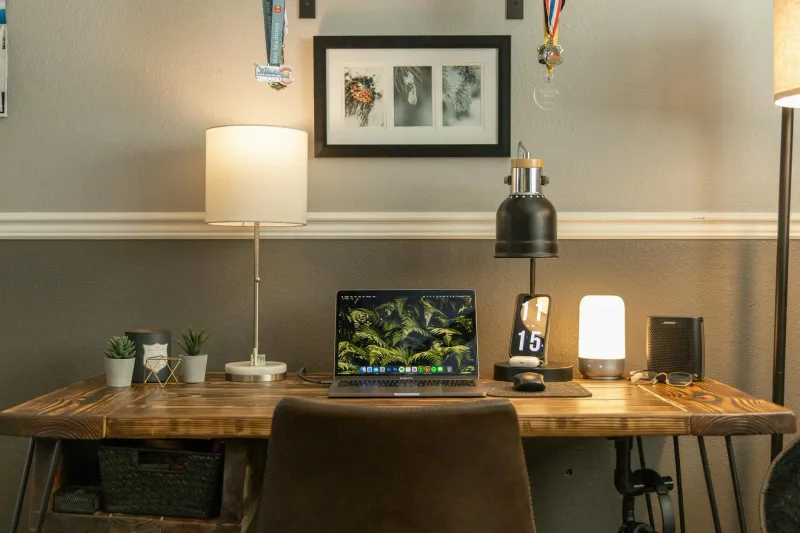
Good desk lighting does not just make a setup look better. It reduces contrast between the screen and the room, makes the keyboard easier to see and can stop the late-afternoon eye strain many people blame only on the monitor.
I prefer adjustable light: brightness control, several colour temperatures and no obvious flicker. A cheap lamp with one harsh setting is usually worse than a slightly more expensive one you can tune down.

SLATOR LED Desk Lamp
A sensible low-cost LED desk lamp with brightness levels, colour modes, memory and a timer. Good starter option for a home office.
Checked: 05/24/2026
Desk lamp, clamp lamp or monitor light bar?
The first decision is the lamp format. Do not start with brand or brightness. Start with the room and desk.
Desk lamp
A traditional desk lamp is the most flexible option. It works well if you read paper documents, write notes, move around the desk or need light away from the monitor. The downside is desk footprint. On small desks, the base can get in the way.
Clamp lamp
A clamp lamp is useful when desk space is limited. It attaches to the edge of the desk, shelf or side surface and keeps the base off the work area. Check clamp depth and cable route before buying.
Monitor light bar
A monitor light bar is best when most of your work happens on an external monitor. It lights the keyboard and desk surface from above without taking desk space. Good light bars avoid screen glare and create a clean setup.
The limitation is flexibility. If you work with paper away from the monitor, a normal lamp may be better.
How much light do you really need?
The goal is not to flood the desk with maximum brightness. The goal is a balanced workspace where the screen is not the only strong light source.
You need enough light to:
- See the keyboard and desk surface clearly.
- Read notes without leaning forward.
- Reduce contrast between screen and room.
- Avoid glare on the monitor.
- Keep video calls from looking dark or backlit.
For screen work, dimming matters more than a huge maximum output. A lamp with several brightness levels is easier to live with than a powerful lamp stuck on one harsh setting.
Colour temperature
Neutral light around 4000-5000 K is usually best for work. Warm light is more relaxing but can feel sleepy during focused tasks. Very cool light can feel harsh if used all day.
If the lamp has adjustable colour temperature, use neutral during work and warmer tones later in the day.
Flicker and glare
Flicker is hard to judge from a product photo but can make long sessions uncomfortable. Glare is easier to manage: the lamp should light the desk, not your eyes or screen.
Place the light so it crosses the desk surface from the side or above, not straight into the monitor.
When not to buy a new lamp
Sometimes the issue is not the lamp. Try these first:
- Move the desk perpendicular to the window.
- Adjust blinds to remove direct glare.
- Match screen brightness to the room.
- Replace an overly warm ceiling bulb with neutral light.
- Add ambient light if the whole room is dark.
If the room is black and the monitor is bright, a small desk lamp may help, but ambient light may be the real missing layer. Read how to improve your workspace lighting before overbuying.
Best LED desk lamps compared
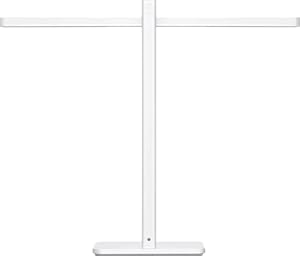
Xiaomi LED Desk Lamp 2
Checked: 05/24/2026
Minimal design and adjustable white light. A good choice if you want a cleaner-looking lamp rather than a basic plastic flexo.
SLATOR LED Desk Lamp
Checked: 05/24/2026
Best value starter lamp: several colour modes, brightness levels, timer, memory and USB charging.
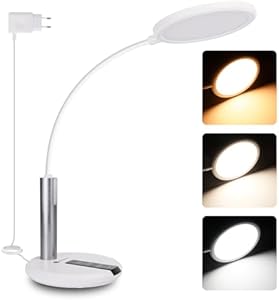
Aigostar LED Desk Lamp
Checked: 05/24/2026
Flexible neck, several light modes and a practical long cable. Simple but useful for small desks.

Hokone Clamp LED Lamp
Checked: 05/24/2026
Clamp format saves desk space and suits smaller rooms or desks already crowded by monitors and laptop stands.

EYOCEAN Clamp Lamp 12W
Checked: 05/24/2026
More powerful clamp option with remote control and flexible positioning. Useful if you need light across a wider work area.
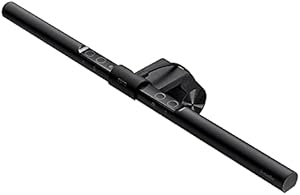
BenQ ScreenBar
Checked: 05/24/2026
Monitor light bar that saves desk space and avoids screen glare. Best for people who work mostly on an external monitor.
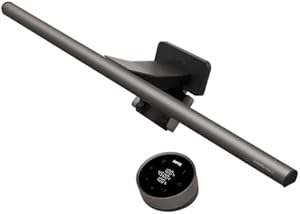
BenQ ScreenBar Halo 2
Checked: 05/24/2026
Premium monitor light bar with ambient back light and refined controls. Expensive, but the cleanest lighting setup.
Detailed analysis of each lamp
SLATOR LED Desk Lamp: best value starter lamp
The SLATOR is the sensible low-cost option. It gives you the features I would want in a first home-office lamp: several brightness levels, multiple colour modes, memory and a timer.
It is not the most elegant lamp in the list, but it solves the most common problem: a desk that is too dark compared with the monitor. If you are still working under only ceiling light, this is a practical upgrade.
Best for:
- First home-office lamp.
- Budget setups.
- Desks that need basic task light.
- Users who want dimming and colour modes without paying for a premium light bar.
Aigostar LED Desk Lamp: functional and simple
The Aigostar is a straightforward lamp for people who want flexible positioning and basic light modes. It is not the lamp I would buy for a premium desk setup, but it can fix poor desk visibility without overcomplicating the decision.
It suits:
- Small desks.
- Occasional evening work.
- Users who want a simple adjustable neck.
- People who need better task light quickly.
The main limitation is that a basic lamp depends heavily on placement. If you point it at the screen or into your eyes, even a decent lamp becomes annoying.
Xiaomi LED Desk Lamp 2: cleaner design
The Xiaomi LED Desk Lamp 2 is the cleaner design option. It makes sense if the desk is visible in a living room or bedroom and you want a lamp that looks intentional rather than purely functional.
It is best for people who want controlled white light, a minimal footprint and a calmer visual style. If your setup is compact and you care about aesthetics, this is easier to integrate than many larger task lamps.
Best for:
- Minimal desks.
- Visible workspaces.
- Users who want adjustable white light in a cleaner form.
Hokone Clamp LED Lamp: first clamp option
The Hokone clamp lamp removes the base from the desktop, which can be more valuable than it sounds. On a small desk, a lamp base competes with keyboard, mouse, notebook and monitor stand.
Choose a clamp lamp if your desk surface is tight or if you can mount the light on a shelf above the monitor. Before buying, check the clamp opening, desk edge thickness and whether the cable will route cleanly.
Best for:
- Small desks.
- Desks with no room for a lamp base.
- People who want light from above or the side.
EYOCEAN Clamp Lamp 12W: stronger clamp lighting
The EYOCEAN is the more capable clamp option. It makes sense when you need to light a wider desk area or want more control without using a traditional desk lamp.
This is the model I would consider if the desk is already crowded and a normal lamp would make the workspace feel smaller. It is also useful if you use a monitor arm, laptop stand or accessories that leave no clean place for a lamp base.
Check EYOCEAN clamp lamp on Amazon (opens in a new tab)BenQ ScreenBar: best monitor-focused upgrade
The BenQ ScreenBar is the upgrade for people who work on an external monitor all day. The key benefit is not just brightness. It is directional light that illuminates the desk while avoiding screen glare.
It also removes a lamp base from the desk. That makes the setup feel cleaner and helps small workstations.
Best for:
- External-monitor setups.
- Small desks.
- Evening work.
- People who want no lamp base.
- Users sensitive to screen reflections.
BenQ ScreenBar Halo 2: premium clean setup
The ScreenBar Halo 2 is the premium option. It is expensive compared with basic lamps, but it is also the cleanest solution if lighting is a major part of your setup.
The rear ambient light is useful because it reduces the contrast between monitor and wall. That matters in darker rooms, especially during evening work.
Buy it if:
- You work long hours at an external monitor.
- You want both desk and ambient light.
- You value a clean, cable-light setup.
- You already know lighting is a real pain point.
Do not buy it first if a simple lamp or room-light change would solve your problem.
Check BenQ ScreenBar Halo 2 on Amazon (opens in a new tab)What I would buy
For a normal desk, start with SLATOR or Xiaomi. For a very small desk, choose a clamp lamp. If you use an external monitor all day and want the cleanest solution, a BenQ ScreenBar is the upgrade that makes the biggest difference.
For a full lighting setup, read how to improve your workspace lighting.
What to check before choosing
Adjustable brightness
Non-negotiable. The same brightness does not work at noon and at night.
Adjustable colour temperature
Useful if you work at different times of day. Neutral for work, warmer later.
Positioning
The lamp must aim where you need it. A good-looking fixed lamp can be worse than a plain adjustable lamp.
Desk footprint
If the desk is small, clamp lamp or light bar may be better than a base.
Screen glare
The lamp should not reflect on the monitor. This is why monitor light bars exist.
Mistakes to avoid
Buying the brightest lamp. More brightness is not always better. Control matters.
Using only ceiling light. Ceiling light often leaves the desk dim and the screen too dominant.
Pointing the lamp at the screen. Light the work surface, not the display.
Ignoring cables. Every lamp adds a cable. Plan the route with desk cable management.
Solving video calls but not work light. A ring light can help calls, but it is not automatically a good task lamp.
Recommendation by case
- Best first lamp: SLATOR LED Desk Lamp.
- Best clean design: Xiaomi LED Desk Lamp 2.
- Best for small desks: Hokone or EYOCEAN clamp lamp.
- Best monitor setup: BenQ ScreenBar.
- Best premium lighting: BenQ ScreenBar Halo 2.
Lighting is one of the cheapest changes that can make a desk feel more professional and less tiring. Choose the format that solves your room, not the one that looks best in a product photo.
How to place the lamp
Placement is the difference between useful light and glare.
For right-handed writing, place the lamp on the left so your hand does not cast a shadow. For left-handed writing, place it on the right. For screen-only work, position it so the desk is lit but the monitor does not reflect the bulb or LED strip.
If you use a monitor light bar, angle it toward the keyboard and desk surface, not the screen. If you use a clamp lamp, test the arm at several positions before tightening the cable route.
Lighting setups by room
Desk beside a window
Use natural side light during the day and a lamp when the sun drops. Add blinds if direct sun crosses the screen.
Desk facing a wall
Use task light for the desk and soft ambient light behind or beside the monitor. A dark wall plus bright screen can cause fatigue.
Bedroom workspace
Choose a lamp with warmer evening settings. You need work light during the day, but harsh cool light late at night can make the room feel less restful.
Small apartment desk
Use a clamp lamp or light bar to avoid losing surface area. Keep cable routing clean so the setup does not visually take over the room.
Desk lighting for video calls
A desk lamp that lights the keyboard may not light your face well. For video calls, the face needs soft light from the front or side.
Avoid:
- Window directly behind you.
- Lamp below your face.
- Harsh direct light pointed at your eyes.
- Monitor as the only face light.
If calls matter, combine task light with soft room or side light. A monitor light bar can improve the desk but may not be enough for face lighting.
How to test the lamp in five minutes
- Open a white document.
- Set screen brightness to normal.
- Turn the lamp on at medium brightness.
- Check the screen for reflections.
- Type for two minutes.
- Look at the keyboard, notebook and wall.
- Lower or raise brightness until the screen and room feel balanced.
If you immediately notice the lamp, it may be too bright, too cool or badly aimed. Good lighting becomes boring after a few minutes.
Do you need one lamp or two?
One lamp is enough if the room already has decent ambient light. Two light sources help when the room is dark or video calls matter.
A common good setup:
- Ambient room light to reduce contrast.
- Task lamp or light bar for the desk.
- Window controlled with blinds.
Do not solve every lighting problem with more devices. Sometimes moving the desk or changing one bulb is better.
Final checklist
- Desk surface is lit evenly.
- Screen has no direct reflection.
- Brightness is adjustable.
- Colour temperature suits work hours.
- Lamp does not take too much desk space.
- Cable route is planned.
- Video-call lighting is checked separately.
If you work long days at a monitor, a good lamp is not decoration. It is part of the ergonomic setup, along with chair, monitor and desk height.
Lux, lumens and distance in plain English
Product pages often talk about lumens, but what you feel at the desk depends on distance, direction and beam shape. A lamp can have a high output and still fail if it throws light into your eyes or creates a bright spot with dark surroundings.
Think in practical terms:
- Can you read notes without leaning forward?
- Does the keyboard look clear?
- Does the monitor still feel comfortable?
- Does the lamp create a harsh reflection?
- Can you dim it when the room gets darker?
For home office work, control beats raw output.
CRI and colour quality
CRI describes how naturally colours appear under a light. It matters more for design, photography, craft work and any task where colour judgement matters.
For normal office work, you do not need to obsess over it, but very poor colour quality can make a workspace feel unpleasant. If you do design or visual work, choose a lamp with better colour rendering and stable light.
Flicker sensitivity
Some people are sensitive to flicker even when it is not obvious. Symptoms can include headache, fatigue or a sense that the light feels harsh.
If a lamp makes you uncomfortable despite good placement, test another light source before blaming the monitor. Premium light bars and better LED lamps often handle this better than very cheap lamps, but product quality varies.
Cable and power details
A lamp can solve one problem and create another: cable clutter.
Before buying, check:
- Cable length.
- Whether it needs USB power or wall power.
- Where the adapter will sit.
- Whether the switch is on the cable, base or remote.
- Whether the cable route crosses the desk.
For clamp lamps and light bars, cable route is especially important because the lamp may sit high while power comes from below.
Lamp choice by work type
Coding and writing
Prioritise even desk light, neutral colour and no screen reflection. A monitor light bar or adjustable desk lamp works well.
Reading paper documents
Choose a flexible desk lamp or clamp lamp. You need light where the paper is, not only above the keyboard.
Design and colour work
Look for better colour quality and consistent brightness. Avoid lamps with strange colour casts.
Video-call-heavy work
Pair task lighting with face lighting. A desk lamp alone may leave the face too dark or create shadows.
Small desks
Choose clamp or monitor light bar. Surface area is too valuable to spend on a large base.
Why a monitor light bar can feel expensive but rational
A BenQ ScreenBar costs much more than a basic lamp, but it solves several problems at once:
- No desk base.
- Less screen glare.
- Keyboard and desk illumination.
- Clean cable route.
- Consistent position.
It is not necessary for everyone. But if you work at an external monitor all day and have limited desk space, the value is not only light quality. It is the whole workspace improvement.
Final verdict
If your desk is simply too dark, buy SLATOR or Xiaomi. If the desk is small, buy a clamp lamp. If your whole day happens at an external monitor and you want the cleanest setup, buy a BenQ ScreenBar. If you want premium desk and ambient lighting in one system, choose ScreenBar Halo 2.
The right lighting upgrade is the one that makes your eyes stop noticing the room.
Questions before buying
Do you work mostly on screen or paper?
Screen work benefits from balanced room and desk light. Paper work needs more flexible task light. If you read documents, a normal adjustable lamp may beat a monitor light bar.
Is the room dark or is the desk dark?
If the whole room is dark, add ambient light. If the room is fine but the keyboard area is dim, add task light. These are different problems.
Is glare the real issue?
If a window reflects on the monitor, a new lamp may not help. Move the desk, adjust blinds or change monitor angle first.
Do you need the lamp for calls?
A desk lamp may not light your face well. For calls, you need soft light from the front or side. Do not assume a keyboard lamp fixes video quality.
Can the lamp stay on the desk all day?
If it gets in the way, you will move it, and then stop using it. Small desks usually need clamp lamps or light bars.
Cheap lamp vs premium light bar
A cheap lamp is the right choice when the problem is simple: the desk is dark. A premium light bar is rational when several problems overlap: limited desk space, screen glare, external monitor use and evening work.
Buy cheap first if:
- You do not know what the room needs.
- You need basic task light.
- Desk space is not a problem.
- You rarely work at night.
Buy a light bar if:
- You use an external monitor all day.
- Desk space is tight.
- You dislike visible lamp bases.
- Glare control matters.
- You want a cleaner permanent setup.
How lighting affects posture
Poor light changes posture. If text or notes are hard to see, you lean forward. If glare crosses the screen, you tilt your head. If the monitor is the only bright object, you may squint and tense your face.
That is why lighting belongs in an ergonomics setup. It affects eyes, neck, shoulders and focus. If you have neck pain and eye strain together, lighting is one of the first things to check.
Maintenance
Keep the lamp useful:
- Dust the LED bar or shade.
- Check the hinge or clamp stays firm.
- Recheck reflections after moving the monitor.
- Keep the cable route clear.
- Save preferred brightness modes if the lamp supports memory.
A lamp that slowly droops or reflects into the monitor becomes a daily annoyance.
Final recommendation
For most people, the best first move is a dimmable LED desk lamp or clamp lamp. For monitor-based work and small desks, BenQ ScreenBar is the clean upgrade. For premium setups where ambient contrast matters, ScreenBar Halo 2 is the most complete option.
Lighting problems and likely fixes
The monitor feels too bright
The room is probably too dark or the screen brightness is too high. Add ambient light and lower the monitor slightly.
You see reflections
Move the light source or desk angle. A better lamp will not help if it is placed in the reflection path.
Paper notes are hard to read
Use a flexible desk lamp or clamp lamp. A monitor light bar may not reach far enough.
Calls look bad
Add soft face light from the front or side. Do not rely on the desk lamp alone.
The desk feels cluttered
Choose a clamp lamp or monitor light bar and route the cable behind the monitor.
Morning and evening settings
Use brighter neutral light during work blocks. In the evening, lower brightness and move warmer if the lamp allows it. The point is not to make the room dark; it is to reduce harshness while keeping enough light around the screen.
If you work late often, this adjustability matters more than maximum brightness.
Final buying rule
Buy a lamp for the lighting problem you actually have:
- Dark desk: basic dimmable lamp.
- No desk space: clamp lamp.
- Screen glare and monitor work: light bar.
- Dark wall behind monitor: light bar with ambient back light or extra room light.
- Calls: face lighting plus task lighting.
What I would test before returning a lamp
Before deciding a lamp is bad, test placement.
- Move it to the opposite side of the desk.
- Lower brightness.
- Change colour temperature.
- Angle it away from the screen.
- Add ambient room light.
- Check reflections with a dark and white screen.
Many lamp problems are placement problems. A good lamp aimed badly creates glare. A basic lamp aimed well can be enough for a normal home office.
When to upgrade later
Start simple if you are unsure. Upgrade when:
- You work evenings often.
- You use an external monitor all day.
- Desk space is tight.
- Eye strain returns despite basic lighting.
- Calls are part of your professional image.
- You need better colour quality for visual work.
This staged approach avoids buying a premium light bar when all you needed was a neutral bulb and a better desk angle.
Final thought
Lighting is one of those upgrades that feels invisible when it is right. You stop squinting, stop leaning forward, stop fighting reflections and stop noticing the monitor as the only light in the room. That is the result to aim for.